Wacom Bamboo Graphics Tablet
| Wacom Bamboo Pen Tablet |
![]() |
Overall Rating: |
| Retail Price: $79.95 |
| Amazon Price: Too low to display |
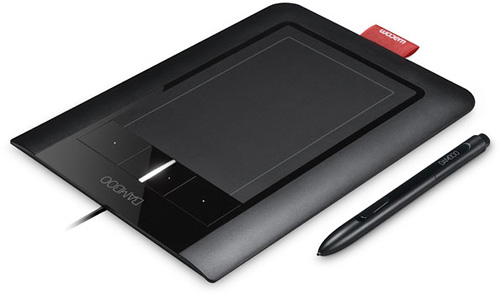
If you want to use it for producing digital artwork in a graphics program, then the Bamboo will be an excellent choice. The widescreen 3.7 x 5.8 inch active area will mean that your pen strokes will be transfered to the screen with 512 levels of pressure sensitivity pin point accuracy. Add to this the ability to use the built in Wacom “Touch Ring” to scroll and zoom in and out of images and you will soon be creating masterpieces along with the thousands of other Wacom Bamboo users.
The Wacom Bamboso also houses 4 programable function keys that can be assigned to macros, menu items or mouse functions. This will help you speed through your application and will make creating digital art a breeze.
The Wacom Bamboo is also an excellent USB graphics tablet for taking with you to work,school or college for taking notes, annotating documents or even simply signing your emails. Designed with Windows Vista in mind, but also supporting Windows XP and Mac OS X, the Wacom Bamboo tablet is reinventing the pen for the 21st century.
![]() |
|
Wacom Bamboo Craft Pen and Touch Graphics Tablet Fun AU US $238.63
|
Wacom Bamboo Fun Pen with mouse and pad blue US $64.14
|
The tablet connects to your computer via a standard USB connection and is supplied with a driver CD for Windows and Mac computers. Also included is a CD containing an application suite for Windows computers as well as a detailed manual instructing you how to use your new tablet.
If this is your first tablet, then you cannot go wrong with the excellent low price, the great specification and the ease of use.
| Detail | Value |
|---|---|
| Model Name | Bamboo |
| Includes Pen | Yes |
| Includes Wacom 3D Mouse | No |
| Widescreen format | Yes |
| Supprts left and right handed users | Yes |
| Active Area Size (inches) | 3.7 x 5.8 |
| Physical dimensions (inches) | 7.875 x 7.25 x .5 |
| Pressure sensitivity levels | 512 |
| Express Keys | 4 |
What size graphics tablet should I buy
The various makers and manufacturers of graphics tablets and interactive pen displays have realised that people want to use them for different things. Some people use them to produce high quality, commercial images used for advertising, print and film, where as others will be used by part time creative people or children.
The smaller and cheaper graphics tablets such as the Wacom Bamboo model have been produced with the younger market in mind. A small, colored tablet that allows even the smallest computer artist to unleash their creativity onto the screen. Wacom have identified that this market needs a smaller canvas to work on and therefore the smaller tablets come in sizes of around 6 x 4 inches active area. This is the area where you can use the pen to draw.
These smaller tablets are perfect for a first time user or someone who may only want to use them to annotate documents or create images now and then. For the person who wants to use the tablet more often, they are supplied in a series of larger sizes, from 6 x 4 inches up to 18 x 12 inches. These graphics tablets are designed with the professional in mind and offer a larger drawing area which in turn will provide a higher resolution output to the screen. The larger the graphics tablet, the more detailed your work will become. Although it may be tempting to start with a larger tablet, if you are a first time user, it might be prudent to start with something smaller.
The next sizes and levels up from these graphics tablets will be the interactive pen displays that allow you to draw directly onto a screen as if you were using the application through the tablet. These products do come at a price as they also incorporate the same technology as a TFT screen but the experience of using one means that you can be more tactile with the image and you will produce better results. The largest of these displays allows you to draw directly onto the same size area as a 21 inch monitor. The “active area” is 17 x 12.5 inches which will allow you to really get to grips with creating digital artwork and images.
To conclude this advice, I suggest that if you are younger, a less frequent user of graphics applications or you just want to try your hand at making digital artwork, a smaller graphics tablet is your best choice. However, if you are already a traditional artist looking to transfer to a digital medium, a larger digital pen display would suit you better as it will be easier to work with based on your current skills and experience.


US $238.63