Wacom Bamboo Fun Medium Graphics Tablet
| Bamboo Fun (Medium) Black Tablet with Pen, Mouse & Graphics Software |
![]() |
Overall Rating: |
| Retail Price: $199.99 |
| Amazon Price: View Sale Price |
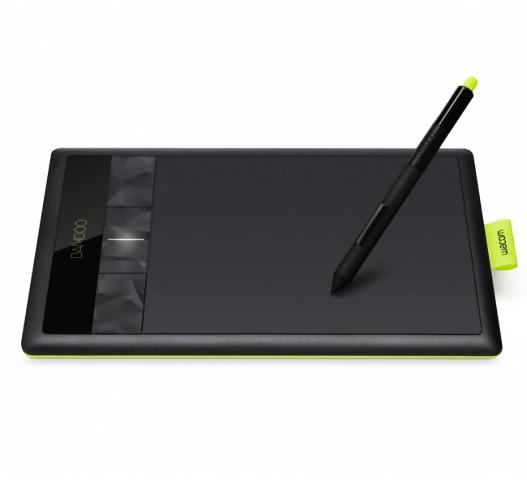
Essentially, the Bamboo Fun Medium is exactly the same as the Bamboo Fun, but it come equipped with a larger active area to draw on with either the Wacom Fun Pen or the Wacom Fun Mouse. With a larger active area it will allow for longer lines or strokes to be drawn and greater accuracy and detail to be achieved in your drawings. Remember that the active area on the graphics tablet corresponds exactly to the screen, so the larger the tablet, the better accuracy you will get.
![]() |
|
WACOM CTH661 BAMBOO FUN MEDIUM PEN TOUCH DRAWING TABLET US $199.95
|
NEW Wacom Bamboo Fun Medium Pen Tablet Software CTH661 US $199.99
|
As with the smaller version of the Bamboo Fun, the medium size version comes in 4 different colors to suit anyone. Electric blue, silver, white and black versions are available and the pen and mouse are also colored to match. As with the younger sibling, the Medium still has the same 4 programable buttons that allow you to select macros or menu items with one click and it also features the Wacom “touch ring” which allows you to quickly zoom in and out of the document or image you are working on in the same way that you use the click wheel of an iPod.
Overall, other than physical size and a greater active area, there is no difference between the small and medium sizes. You might be lead to think that there is a Wacom Bamboo Fun Large model hiding somewhere in the product lineup but that space is reserved by the Intuos range of tablets from the same manufacturer.
The bottom line is that if you want to get into creating and editing digital images or graphics on your PC or Mac, this is a perfect entry level product. The medium size version of the Bamboo Fun graphics tablet will ensure that you have a larger area to work on and you will feel less restricted or constrained.
| Detail | Value |
|---|---|
| Model Name | Wacom Bamboo Fun Medium |
| Includes Wacom Fun Pen | Yes |
| Includes Wacom Fun Mouse | Yes |
| Widescreen format | Yes |
| Supprts left and right handed users | Yes |
| Active Area Size (inches) | 8.5 x 5.3 |
| Physical dimensions (inches) | 11.0 x 9.3 x 0.3 |
| Pressure sensitivity levels | 512 |
| Express Keys | 4 |
What is a graphics tablet used for
The main and primary reason why someone would want to use a graphics tablet is to aid their input to a computer. A graphics tablet is a device that allows the user to use a stylus or pen to make strokes and marks like a normal pencil on paper but the marks appear on the computer screen within the chosen application.
When combined with an application such as Microsoft Paint, GIMP or Adobe Photoshop the device allows the user to draw, paint and perform creative functions with the computer as if they were drawing or painting using traditional artists media. Some artists use the mouse as an input device for drawing on the computer and creating digital artwork, but a graphics tablet or digitizing pad device is much better suited to this task.
The pen that is supplied with the graphics tablet is a wireless or an untethered device that allows the user to place the point anywhere on the active area of the tablet and the computer will place the mouse cursor in the corresponding place on the screen. When the pen is raised from the active area on the tablet and moved to a new location, the mouse cursor follows the movement and therefore provides 1-to-1 mapping between the device and the screen.
This allows the user to experience no barriers between using the technology and their creativity. The stylus acts as their paintbrush or pencil and the computer software provides the brushes, colors, designs and creative elements they need. The stylus pen is also sensitive to 1024 levels of force, so the lighter you touch the tablet, the lighter the stroke will appear on the screen. If you think of watercolor painting, this would provide different levels of transparency and the ability to perform washes of color.
A graphics tablet can also be used as a text input tool. Software is available that can track, recognize and convert any written text that is entered via the tablet and change it to be normal words that can be edited in any word processing application. The tablet also allows you to annotate documents or files with written notes or highlights and also mark areas for reworking or importance.
What ever you can do with a mouse, you can do with a graphics tablet too. As it provides 1-to-1 tracking between the active area and the screen, you can use it to click on menu items, double click icons or any other mouse related gesture or function.
The Pros And Cons Of Using A Graphics Tablet
There are many reasons why you would want to use a Graphics Tablet or interactive pen display to help you produce digital art and images - and not many against! I will cover a few of the plus points of owning one of these devices and then summarize some of the downsides too. But be prepared for more pro’s than con’s.
Pro’s:
A USB Graphics Tablet can be used in all applications. It is not just tied to being used within a specific graphics application like Adobe Photoshop or Corel Draw. If you wanted to use Microsoft Paint on your PC to make an image, you can. Or if you wanted to use it to re-organize your images in iPhoto on the Mac, you can do that too. The tablet is totally application independent. Sure, some software manufacturers will provide add-ons and plugins to their software to make it easier to use with a Graphics Tablet, but they can be used without it too.
I guess that because you are reading this, you are considering buying a Graphics Tablet. Up until this point you may have been attempting to draw using the mouse and found it very frustrating. Holding the mouse is a very natural position for clicking your way through internet pages or navigating through your library of digital photos, but it is not the best method of drawing. For a start, the hand is facing forwards, where as when you are drawing, your hand is normally facing slightly to the left or right, across your body. Using a mouse, it is very hard to produce fluid strokes as you would do with a pen or pencil but when you use a Graphics Tablet, it frees you from the shackles of the mouse and takes you back to the better, more natural position and angle.
Graphics tablets are also easy to use. A child could easily use one to produce images on a PC or Mac. What could be more intuitive for a child to learn to draw and write onto a computer screen where mistakes can be erased and their imagination can be unleashed.
Con’s:
It has to be said that these graphics pads and interactive pen displays do come at a price. You might want to start with a cheaper model, just to see how you get on with using it before you take the plunge and pay out for a top of the range Wacom screen.
They also take a little getting used to and if you are an established painter, drawer or artist you might initially struggle with transferring your techniques and talents to the screen. Having said that, being able to undo and re-arrange your work as you see fit until you are happy does have it’s benefits too.
So as you can see, there are more Pro’s than there are Con’s. At the end of the day, it may all come down to price over function. Also consider how often you would use the device and what it will be used for. You may not need the most expensive interactive pen display if you are only removing red eye from your digital images once a month.
What Is A Graphics Tablet
There are many reasons why a traditional artist may want to transfer to using a digital medium. With the advent of the Internet and digital publishing, the format and tools used to create publications have changed rapidly sometimes leaving the artist behind with out-dated skills.
Put simply, a graphics tablet or interactive pen display unit is an input device that allows the user to draw using a pen or stylus on to a surface or active area and those markings be transferred to the computer screen.
Rather than using a mouse to draw in an application such as Corel Draw or Corel Painter, the user is able to sketch freehand using a traditional pen and have the image appear on the screen in front of them. They also have the ability to use different brush types, sizes, thicknesses that the application provides and the full range of colors and transparencies that modern computers allow.
Unlike older models, when the pen or stylus is lifted from the active area of the graphics tablet, the device still knows where it is located. When you then reapply the stylus to the tablet, the cursor on the screen moves in unison so that you are able to move freely around the canvas or document as if it was a piece of paper.
A Graphics Tablet will remove the barrier between the artists hand and the computer. Using a normal computer mouse for freehand artwork or drawing is not possible and results in jagged or irregular lines and images. In comparison, a graphics tablet will allow the user to create flowing, fluid freehand designs and strokes as if they were working on paper.
The tablet or pad will connect to the computer via a USB cable, serial cable or wireless Bluetooth connection and will come with software, drivers or application plugins that allow the device to work properly. The software will also allow the user to define parameters such as how sensitive the device is or how the stylus behaves under certain conditions. Most modern graphics tablets also have buttons and selectors that allow the user to create custom functions or macros that can easily be selected.
The graphics tablets and pen input display devices come in a variety of sizes and are supplied targeted towards a range of people. At the lower end of the market, the graphics tablets have a smaller active area and are more suited to younger or less experienced artists and creative people. At the other end of the spectrum are the interactive pen display devices which combine a graphics tablet and a TFT monitor to allow the user to draw directly onto a screen. There are also larger models available for functions such as architecture or drafting.
If you can use a pen or pencil to draw, then you will be able to use a graphics tablet too. They are simple to install and easy to use and allow you freedom to create all manner of digital artwork. They can also be used for handwriting recognition and document annotation.


US $199.95