Wacom Cintiq 12WX Interactive Pen Display

August 15, 2009 by admin  
Filed under Reviews, Wacom

Wacom Cintiq 12WX 12-Inch Pen Display Wacom Cintiq 12WX 12-Inch Pen Display
List Price: $1,199.00
Sale Price: Too low to display
  Eligible for free shipping!
Availability: Usually ships in 24 hours

When it comes to buying a graphics tablet, it comes down to several important points that you have to consider. The first being what you actually are going to use the tablet for and secondly how much you are prepared to spend to get what you want. There are many different models, sizes, makes and styles you can buy these days and they also range from the first time home user types to the industry standard models used by professional artists.

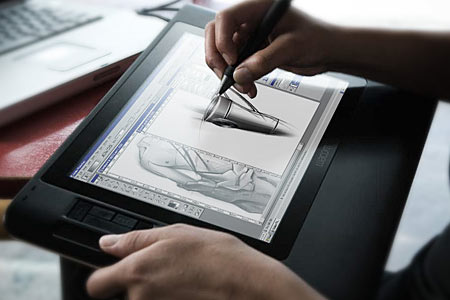
The Wacom Cintiq 12WX is one that falls into the middle of these categories. It is an interactive pen display rather than a USB graphics tablet, which allows you to draw directly onto the screen of your application rather than having an external pad that acts as an input to a separate screen. Imagine if you could take your flat screen monitor, angle it to suit and then draw directly into Corel Painter with a cordless pen. That is the benefit an interactive pen display gives you over a graphics tablet. But it is not too expensive or large to be a professional product, and not too small or feature lacking to be a consumer item.

The Wacom Cintiq 12WX houses a bright 1280 x 800 pixel LCD screen, which is a diagonal equivalent to a 12 inch monitor. Onto this screen, you use the supplied cordless pen or stylus which is sensitive to 1024 levels of pressure, giving you finer control over your strokes and marks. The display also allows for 16.7 million colors to be displayed, as per a normal TFT flat screen monitor.

The Cintiq 12WX can be used flat, like a pad or at an angle which can be defined by an adjustable stand on the rear. The connection to your PC or Mac is via a standard USB cable, DVI or VGA and an additional power connection is also required. It also has a pretty long connection wire too, so you can quite comfortably rest it on your lap whist drawing or find the perfect angle to suit you.

As with all other graphics tablets, you simply move the pen over the display and the location is tracked as you move. When you place the pen onto the screen, it is as if you were clicking with your mouse apart from the extra levels of pressure you can apply if you are using a supported graphics program. When you then move the pen, a mark is left on the document you are working on. It is exactly like drawing on paper really and requires no further explanation.

Brand New Wacom Cintiq 12WX Interactive Pen Display UPC 753218994240 Cintiq12WX
US $899.00
Wacom Cintiq 12WX
Wacom Cintiq 12WX
US $720.00
Wacom Cintiq 12WX excellent condition very little use  Originally $999
Wacom Cintiq 12WX excellent condition very little use Originally $999
US $700.00
Wacom Cintiq 12WX
Wacom Cintiq 12WX
US $850.00
Wacom Cintiq 12WX 121 Interactive Pen Display Monitor
US $680.00
Wacom Cintiq 12WX
Wacom Cintiq 12WX
US $750.00
Screen Protector Wacom Cintiq 12wx
US $29.49
Wacom Cintiq 12WX Graphics Pen Touch Tablet
US $879.00
Wacom Cintiq 12 Interactive Pen Display With Pen
US $888.00
Wacom Cintiq 12WX Graphic Tablet Display Intuos3 LCD
US $1,523.79

The Wacom Cintiq 12WX also provides 10 programable buttons that are under your left or right hand as you draw which allow you to select zoom levels or layers within Adobe Photoshop. These can also be customized to launch applications too if needed.

The pen is a standard Wacom “grip pen” and features 2 buttons for mode switching or right clicking and also the ability to turn it over to rub out a mistake, which is taken care of automatically as you do it. No need to swap to the eraser tool with this baby. A pen stand is also provided to stop it from rolling under the desk when you leap up to answer the phone.

Overall, the Wacom Cintiq 12WX is a great interactive pen display and everyone will benefit from drawing directly onto the screen. Compared to using a standard graphics tablet, the Cintiq 12WX is light years ahead and it is definitely one of those products that you will love immediately.

There have been complaints of issues where the pad gets hot and has issues with tracking the motion of the pen, but these are few and far between and overall this is an excellent product if you are interested in moving into digital artwork or image editing.

Incoming search terms:

interactive pen display tablet, Interactive graphic tablet, interactive display tablet, interactive graphics tablet, wacom cintiq 12wx interactive pen display review, interactive graphic tablets, interactive drawing tablet, pen tablet with display, interactive graphics tablet review, graphic tablet interactive display

Wacom Bamboo Fun Medium Graphics Tablet

August 13, 2009 by admin  
Filed under Reviews, Wacom

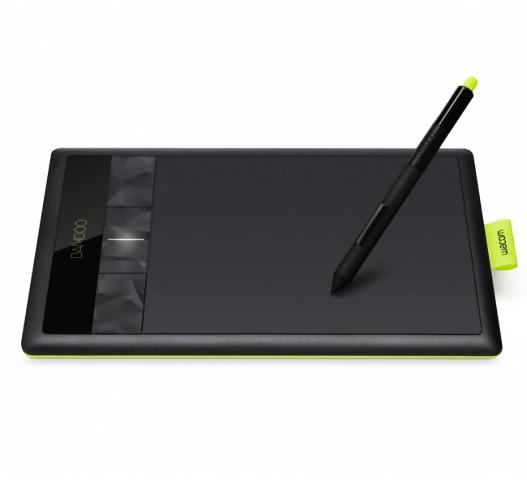
Bamboo Fun (Medium) Black Tablet with Pen, Mouse & Graphics Software Bamboo Fun (Medium) Black Tablet with Pen, Mouse & Graphics Software
Sale Price: $289.99
  Eligible for free shipping!
Availability: Usually ships in 1-2 business days

Wacom are quite a clever company. Not only did they release the perfect consumer entry level graphics tablet, the Wacom Bamboo Fun, they also made it in 4 colors and 2 sizes. This review will cover the larger of the 2 sizes, the Wacom Bamboo Fun Medium. If you want to learn more about the smaller product, then please head over to the Wacom Bamboo Fun review.

Essentially, the Bamboo Fun Medium is exactly the same as the Bamboo Fun, but it come equipped with a larger active area to draw on with either the Wacom Fun Pen or the Wacom Fun Mouse. With a larger active area it will allow for longer lines or strokes to be drawn and greater accuracy and detail to be achieved in your drawings. Remember that the active area on the graphics tablet corresponds exactly to the screen, so the larger the tablet, the better accuracy you will get.

Wacom Bamboo Fun Pen Touch Medium Tablet CTH 670 3G 3rd Gen Optional Wireless
US $237.75
Wacom CTH661 Bamboo Fun Pen Touch Tablet Medium
US $139.88
Wacom Bamboo Fun Pen Touch CTH 670 3G 3rd Gen Medium Tablet Optional Wireless
US $248.56
Wacom Bamboo Fun Pen Touch Medium Tablet CTH661 Free Apps
US $154.99
Wacom Bamboo Fun Craft Medium Carry Case Nylon Bag Pen
US $37.82
Wacom tablet 6x9 Bamboo Fun black medium A5 CTE 650
US $98.99

As with the smaller version of the Bamboo Fun, the medium size version comes in 4 different colors to suit anyone. Electric blue, silver, white and black versions are available and the pen and mouse are also colored to match. As with the younger sibling, the Medium still has the same 4 programable buttons that allow you to select macros or menu items with one click and it also features the Wacom “touch ring” which allows you to quickly zoom in and out of the document or image you are working on in the same way that you use the click wheel of an iPod.

Overall, other than physical size and a greater active area, there is no difference between the small and medium sizes. You might be lead to think that there is a Wacom Bamboo Fun Large model hiding somewhere in the product lineup but that space is reserved by the Intuos range of tablets from the same manufacturer.

The bottom line is that if you want to get into creating and editing digital images or graphics on your PC or Mac, this is a perfect entry level product. The medium size version of the Bamboo Fun graphics tablet will ensure that you have a larger area to work on and you will feel less restricted or constrained.

Detail Value
Model Name Wacom Bamboo Fun Medium
Includes Wacom Fun Pen Yes
Includes Wacom Fun Mouse Yes
Widescreen format Yes
Supprts left and right handed users Yes
Active Area Size (inches) 8.5 x 5.3
Physical dimensions (inches) 11.0 x 9.3 x 0.3
Pressure sensitivity levels 512
Express Keys 4

Incoming search terms:

bamboo fun medium graphics tablet review, bamboo fun medium review, wacom bamboo fun 670, whats the difference between wacom bamboo tablet cth-670 e 661?, wacom fun medium review, wacom bamboo fun 3rd gen silver, wacom bamboo fun pen & touch medium tablet cth-670 3g 3rd gen optional wireless, wacom bamboo tablet review cth 670, wacom bamboo fun medium review, wabcom 670 tablet