Wacom Cintiq 21UX
![]() |
Wacom Techno Cintiq 21UX 21-Inch Interactive Pen Display PC Tablet With Pen and Software List Price: |
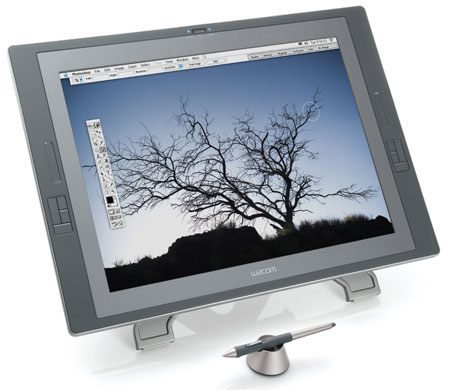
The new Cintiq 21UX from Wacom is another triumph in their excellent line of pen tablets. This new model brings all of the latest technological advances in tablet innovation and delivers it all in a solid package that will let digital artists, designers and creatives draw, paint and write without restriction.
The 21UX features 2048 levels of pressure sensitivity and allows you to rotate the display by 180 degrees in each direction too. The LCD display area is bright and responds well to the stroke of the wireless grip-pen, which has also been refined and is very comfortable to hold and use for long periods of time. To rub something out, simply flip the pen over and begin to erase - the same as a normal pencil. This erase function also allows the use of the 2048 levels of pressure, so making minute or subtle changes is easy.
The tablet stand is totally adjustable too allowing you to incline it between 10-65 degrees. The stand also allows you to quickly unhinge the panel section totally and use it on your lap, or how ever you feel comfortable. The panel did get a little hot during our (brief) test, so I am not sure that having it resting on your legs for long periods of time would be a good idea.
As with the other Cintiq models, the 21UX has an array of quick-access keys and selectors around the edge of the bezel. This makes them very easy to access with your spare hand and they are fully customisable too. If you need to scroll around a document, you can hold the relevant button and then move the page with your pen. After a while, this gets very intuative and natural. You can also use the touch sensitive touch strips for quick zooming, scrolling or adjusting the size of your brush or tool. Unless you are used to using a tablet that has these kinds of additions, they may seem a little gimicky, but they will soon become essential to your productivity. Each strip has an LED that lights up to tell you what mode it is operating in and they are very easy to use.
Wacom supply the usual excellent drivers and software and this interactive pen display is compatible with PC and MAC too, so there are no issues to report there. Once you have registered the tablet online, you are able to download lots of software demos for the major products from Adobe or Corel. Although this cuts down on the items in the box, it may be a pain if you are not connected to the internet.
Incoming search terms:
cintiq 21ux review, what wacom model has leds, wacom cintiq 21ux review, wacom cintiq 21ux g2, DTZ-2100C/G, wacom cintiq 21ux dtz-2100c g, wacom cintiq 21ux ebay, Cintiq 21UX ebay, Wacom Cintiq 21UX 2G 2nd Gen Graphics Interactive details, cintiq 21ux dtz-2100c gWacom Silver Bamboo Fun Graphics Tablet
![]() |
Wacom CTH661 Sliver Bamboo Fun (Factory Refurbished) List Price: |
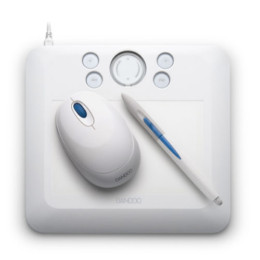
The excellent Wacom Bamboo fun makes drawing, editing and creating easy on your PC or Mac. Supplied in a gorgeous silver finish and with a wireless pen and mouse, you will be getting creative using the packaged software quickly and easily. This USB tablet features 1024 levels of sensitivity and works with a wide variety of software, not just the supplied versions of Adobe Photoshop Elements 5.0, Corel Painter Essentials or Nik Color Efex Pro. You can also use it to annotate or take notes in apps such as Microsoft Office.
The Bamboo fun silver model is the perfect size to take with you to school or work and connects with just a simple USB cable. It is sleek, stylish and fun to use in a wide variety of situations. Don't just take our word for it though, Wacom is the industry standard name in Graphics Tablets. If you want to join the thousands of digital artists, graphics designers and scrapbookers who use this product every day for work and play.
![]() Wacom Bamboo Fun CTE450S Silver Drawing Tablet Pen Mouse Graphic Software US $50.00
|
![]() WACOM BAMBOO FUN small Silver Tablet US $30.00
|
Incoming search terms:
comment on the silver wacom, wacom silver bambooWacom Intuos3 Graphics Tablet Review
![]() |
Wacom Intuos3 6 x 8-Inch Pen Tablet List Price: Sale Price: $239.99 You save: $90.00 (27%) Eligible for free shipping!Availability: Usually ships in 1-2 business days |
Although not the latest models being offered in the Wacom Intuos range of USB graphics tablets, the Intuos3 is still a great buy and you are not really losing out on any features or benefits from paying for the newer Intuos4 range either.
The Wacom Intuos3 graphics tablet is ambidextrous and comes in 6 different sizes to suit all needs and pockets - 4x5, 6x8, 6x11, 9x12, 12x12, and 12x19 inches. This gives the user the perfect opportunity to be able to purchase the size of tablet that they need, be it a smaller, portable unit for home use or a large tablet for professional digital artwork. See our “What Size Graphics Should I Buy” article for more information on choosing the correct size for your needs. The newer Wacom Intuos4 range only comes in 3 different sizes, so the older range already trumps the newer in my opinion.
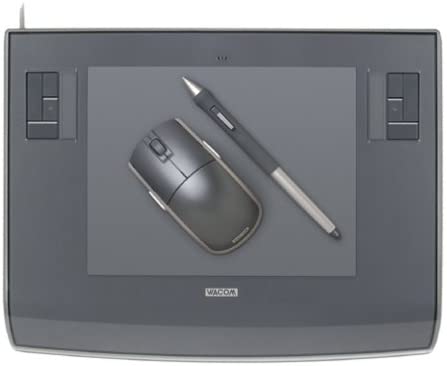
As with all of the Wacom range, the Intuos3 connects via an 8ft USB cable, provides a wireless “Wacom comfort grip pen” that is sensitive to 1024 levels, features several programable buttons and has that oh so handy eraser tip on the other end. Also supplied is a nice Wacom 5 button mouse that you can use on the tablet too, should you suffer writers cramp or need to use the mouse for any reason.
The tracking of the Wacom Intuos3 tablet is second to none. Simply hold the cordless pen over the surface of the tablet and your movement will be followed and the mouse cursor will move on the screen at the same time. The active area of the Intuos3 transposes to the whole of your PC or Mac screen, so where ever you draw on the pad, that is where you draw on the screen. The graphics pad also sports several programable “ExpressKeys” and a touch strip in each top corner of the pad (for left and right handed users). The buttons can be used for tool selection and the touch strip can be used to drag the pen over to zoom in and out of your image or change brush sizes and thicknesses. This is a great addition to the tablet and makes working with applications a breeze.
For those who have never used a graphics tablet before, there is simply nothing else like it. It may sound slightly disjointed or disconnected, but once you have tried it, there will be no going back. It becomes so intuitive and natural, you will wonder how you did with just a mouse for so long.
The Intuos3 pack or bundle comes with over $200 worth of software, drivers, games and utilities, making this a great package to buy if you are on a tight budget. It is a perfect Graphics Tablet for first time and seasoned users and can be put to immediate use editing photos, creating artwork in Adobe Photoshop or signing off your MSN messages in Windows Vista. This is the complete package.
![]() Wacom Intuos 3 PTZ 930 9x12 A4 US $234.95
|
![]() Wacom INTUOS3 PTZ430 4x5 TABLET only NEW perfect US $58.00
|
![]() Wacom Intuos 3 Mouse BRAND NEW NEVER OPENED IN ORIGINAL BOX ZC 100 00 US $49.90
|
![]() Wacom Intuos3 9x12 graphics tablet with pen grip PTZ 930 US $160.00
|
Incoming search terms:
PTZ 930 review, componets of wacom intuos3 graphic tablet ptz-430, wacom intuos 3 graphics tablet ptz-630, wacom intuos 3 pzt-631w wide usb tablet with pen, wacom intuos model ptz 930 review, wacom intuos ptz 930 review, Wacom Intuos3 6 x 8-Inch Pen Tablet, wacom intuos3 6x8-inch wide format tablet ptz 630 review, wacom intuos3 graphics tablet review, Wacom Intuos 3 graphics tablet model PTZ-630Wacom Bamboo Fun Medium Graphics Tablet
![]() |
Bamboo Fun (Medium) Black Tablet with Pen, Mouse & Graphics Software List Price: |
Wacom are quite a clever company. Not only did they release the perfect consumer entry level graphics tablet, the Wacom Bamboo Fun, they also made it in 4 colors and 2 sizes. This review will cover the larger of the 2 sizes, the Wacom Bamboo Fun Medium. If you want to learn more about the smaller product, then please head over to the Wacom Bamboo Fun review.
Essentially, the Bamboo Fun Medium is exactly the same as the Bamboo Fun, but it come equipped with a larger active area to draw on with either the Wacom Fun Pen or the Wacom Fun Mouse. With a larger active area it will allow for longer lines or strokes to be drawn and greater accuracy and detail to be achieved in your drawings. Remember that the active area on the graphics tablet corresponds exactly to the screen, so the larger the tablet, the better accuracy you will get.
![]() Wacom Bamboo Fun Pen Touch Medium Tablet CTH661 Free Apps US $159.99
|
![]() Wacom Bamboo Fun Medium Tablet Black US $46.00
|
![]() Wacom Bamboo Fun Craft Medium Carry Case Nylon Bag Pen US $37.71
|
As with the smaller version of the Bamboo Fun, the medium size version comes in 4 different colors to suit anyone. Electric blue, silver, white and black versions are available and the pen and mouse are also colored to match. As with the younger sibling, the Medium still has the same 4 programable buttons that allow you to select macros or menu items with one click and it also features the Wacom “touch ring” which allows you to quickly zoom in and out of the document or image you are working on in the same way that you use the click wheel of an iPod.
Overall, other than physical size and a greater active area, there is no difference between the small and medium sizes. You might be lead to think that there is a Wacom Bamboo Fun Large model hiding somewhere in the product lineup but that space is reserved by the Intuos range of tablets from the same manufacturer.
The bottom line is that if you want to get into creating and editing digital images or graphics on your PC or Mac, this is a perfect entry level product. The medium size version of the Bamboo Fun graphics tablet will ensure that you have a larger area to work on and you will feel less restricted or constrained.
| Detail | Value |
|---|---|
| Model Name | Wacom Bamboo Fun Medium |
| Includes Wacom Fun Pen | Yes |
| Includes Wacom Fun Mouse | Yes |
| Widescreen format | Yes |
| Supprts left and right handed users | Yes |
| Active Area Size (inches) | 8.5 x 5.3 |
| Physical dimensions (inches) | 11.0 x 9.3 x 0.3 |
| Pressure sensitivity levels | 512 |
| Express Keys | 4 |
Incoming search terms:
bamboo fun medium review, wacom bamboo fun 670, whats the difference between wacom bamboo tablet cth-670 e 661?, wacom fun medium review, bamboo fun medium graphics tablet review, wacom bamboo fun 3rd gen silver, wabcom 670 tablet, wacom bamboo fun medium review, WACOM Bamboo Fun Medium Graphics Tablet, wacom bamboo tablet review cth 670Wacom Bamboo Fun Graphics Tablet
![]() |
Wacom Bamboo Pen and Touch List Price: Sale Price: $69.99 You save: $29.96 (30%) Eligible for free shipping!Availability: Usually ships in 1-2 business days |
With digital artwork and photo editing moving more into a consumer market, Wacom, the industry standard manufacturers of graphics tablets and interactive pen displays, have created the perfect entry level product aimed at those who are just starting to explore their digital creative side. Designed to be portable and stylish, the Wacom Bamboo Fun is perfect for people who want to use a graphics tablet but have no need for anything expensive or too technologically advanced.
Available in 4 colors, (white, silver, black and blue) the Wacom Bamboo Fun will appeal to all ages and skill levels and is perfect for doodling, annotating documents in your own handwriting or creating a new masterpiece in Adobe Photoshop. The Bamboo Fun fits perfectly into your workspace due to it’s slim and meagre size and design. With an active area the same as an A6 piece of paper, it is perfect for drawing, digital painting, touching up digital images or creating layouts in a graphics design application.
Due to it’s small size and low weight and with 4 programable action keys, the Bamboo Fun is perfect for slipping into a laptop bag to take on holiday, to work or to school. Powered by a USB connection to your PC or Mac, the Bamboo Fun is perfect to use anywhere and at any time. Imagine being able to take your own notes in a lesson or sketch ideas at a meeting. It is all possible with a Wacom Bamboo Fun graphics tablet. If you are more of a professional, the Wacom Bamboo Fun Medium offers a greater active area for you to use, or the range of Wacom Intuos graphics tablets are the next step up in size and functionality.
![]() Wacom CTE 450 Bamboo Fun Small Pen Graphics Tablet US $60.02
|
![]() Wacom Bamboo Fun Tablet only Model CTE 450 US $26.00
|
| Detail | Value |
|---|---|
| Model Name | Wacom Bamboo Fun Small |
| Includes Wacom Fun Pen | Yes |
| Includes Wacom Fun Mouse | Yes |
| Widescreen format | Yes |
| Supprts left and right handed users | Yes |
| Active Area Size (inches) | 5.8 x 3.7 |
| Physical dimensions (inches) | 8.4 x 7.3 x 0.3 |
| Pressure sensitivity levels | 512 |
| Express Keys | 4 |


![ACK 40001] WACOM INTUOS4 Cintiq 21UX Accesory kit](http://www.graphicstabletreviews.com/images/e/180647156393_0.jpg)


Eligible for free shipping!